Voice Recorder & Transcriber
- 4.5
- Rating
- 1.00M
- Installs
- Free
- Price
 Analysis by App-foxy
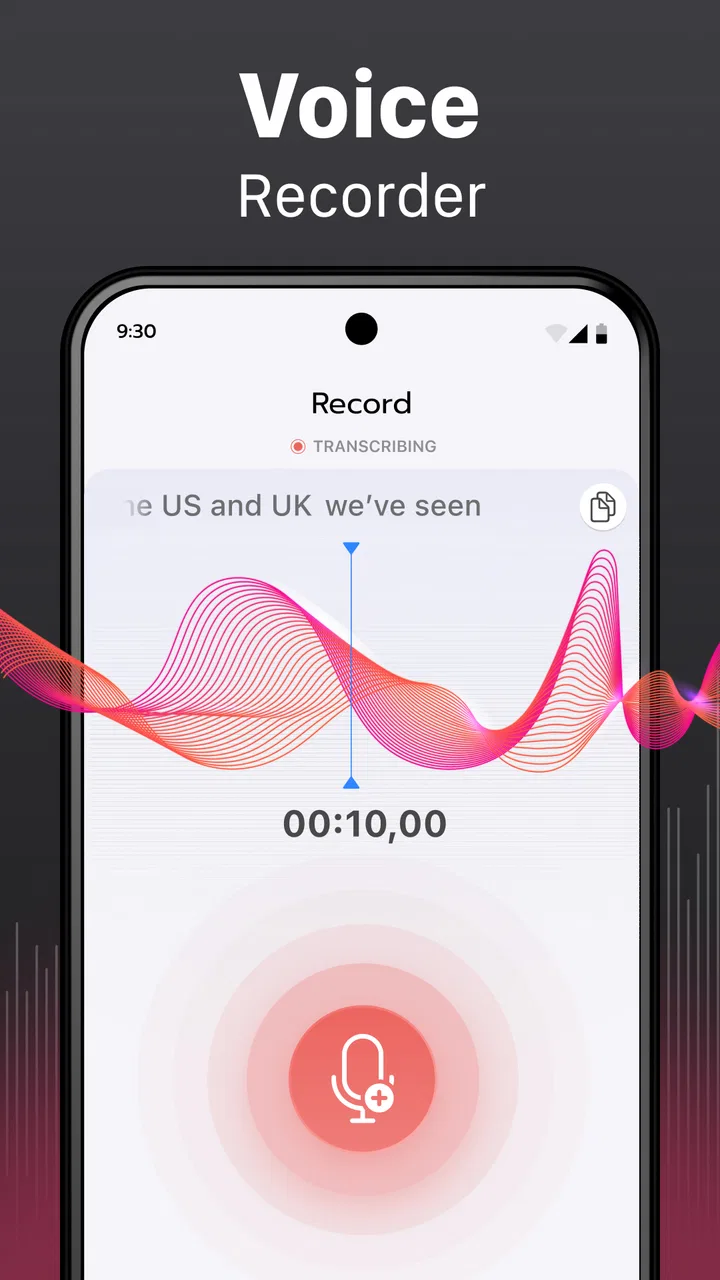
I like productivity apps that remove a small daily annoyance without turning the job into a project. Voice Recorder & Transcriber fits that idea well. I used it as a place to capture spoken notes, turn speech into editable text, and keep the audio alongside the written version when I needed to check wording later. It is straightforward enough for a quick reminder, but it becomes more useful when you build a repeatable routine around recording, reviewing, editing, and exporting.
This is a free productivity app from Rhythmix OU, with optional in-app purchases ranging from $2.99 to $34.99 per item. It is rated for Everyone, works on devices running Android 9 or later, and the current version is 1.6.1. Its store short description calls it “Voice Recorder,” but that label undersells the practical difference between a simple recorder and a tool that also handles speech transcription and text editing.
My everyday workflow with Voice Recorder & Transcriber
My preferred starting point is deliberately simple: I open the app before the conversation, lecture, idea, or personal reminder begins, make a clear recording, and avoid trying to organize everything while I am still speaking. That last part matters. Voice notes become less useful when I interrupt myself to rename files, correct text, or decide where every sentence belongs. I get better results by capturing first and cleaning up afterward.
You May Also Like

 Pandora - Music & Podcasts
Pandora’s Music Is Easy to Start, but Harder to Recover
Pandora’s strength is its low-effort path from a seed to a station. Its weak spot is how much confidence it asks you to place in connection, setup, and quiet recovery.

 AccuWeather: Weather Radar
AccuWeather Review: A Quick, Clear Forecast for Everyday Decisions
For everyday plans, the best forecast is the one you can understand quickly. AccuWeather makes rain timing, radar, and local conditions easy to act on, with a few trade-offs.

 Hill Climb Racing
Why Hill Climb Racing Still Turns Crashes Into One More Run
A tiny car, a bumpy hill and one more upgrade: Hill Climb Racing keeps resurfacing because its simple chaos makes every near-miss feel personal.

 AliExpress - Shopping App
AliExpress Makes Global Shopping Feel Personal, but Shoppers Bear the Risk
AliExpress turns a global marketplace into a pocket-sized discovery engine. Its reach is useful, its shopping loop compelling, and its trade-offs easy to miss.

 Lords Mobile: Kingdom Wars
Lords Mobile Is a Kingdom-Building Routine, Not a Quick Match
A case-by-case verdict on the building, battles, device demands, and social commitments that make Lords Mobile rewarding for some players and exhausting for others.

 PDF Scanner app - TapScanner
TapScanner Makes Paperwork Easier to Capture, Check, and Share
TapScanner makes scanning with a phone feel less like a rescue operation and more like a dependable step in getting work done. Its capture tools are useful, though not flawless.
More From Our News Desk
View All News


After recording, I treat the audio as the original source and the transcription as a working document. I listen back to important sections, scan the text for obvious recognition mistakes, and then edit the wording into something I could actually use. For a shopping reminder, that might mean reducing a long spoken thought to a short list. For a meeting note, I would keep the transcription more complete and use the audio to verify names or phrases before sharing it.
The most reliable habit is to separate capture from correction. Speech recognition is useful because it gives me a searchable, editable starting point, not because it removes the need for a quick review. Background noise, overlapping speakers, unusual names, and rushed speech can all affect the result. I would never treat an unreviewed transcript as final when the wording matters.
The audio-text combination is especially convenient for ideas that arrive while I am away from a keyboard. I can say the thought naturally instead of dictating a polished paragraph, then shape it later. That makes the app more comfortable for outlining an article, planning errands, recording a personal reflection, or saving instructions for a task I do not want to forget.
Where it fits better than a basic recorder
A conventional voice recorder is still perfectly adequate when I only need an audio file. It may even be the better choice for someone who never wants to inspect written output. Voice Recorder & Transcriber earns its place when the text saves time afterward. I can skim a long recording rather than replaying every second, copy a useful passage into another document, and edit the result without retyping the whole note.
It also feels more practical than a standard notes app for thoughts that are faster to speak than type. A notes app gives me a cleaner final workspace, but the first draft can take longer to create on a phone. Here, the recording preserves tone and detail while the transcription gives me something I can reshape. That combination is the main reason I would recommend it over keeping scattered audio files and handwritten fragments.
There is a trade-off, though. If my priority is a full project-management system, collaborative documents, calendars, or elaborate tagging, this is not the tool I would choose as the center of that workflow. I use it as a capture and conversion step, then move finished information to the place where I actually manage the project.
A realistic morning example
Imagine I am walking between appointments and suddenly remember several changes for a work task. I record one uninterrupted note, saying the deadline, the person I need to contact, and the order in which I want to handle the changes. Later, I open the transcription, remove the conversational filler, correct a name, and turn the result into a short action list. I keep the audio until I am satisfied that I did not lose an important detail, then export the text if I need it elsewhere.
This is more dependable than trying to type while walking or trusting myself to remember the idea until I get home. It also avoids a common mistake with voice notes: creating many tiny recordings with no context. One clearly spoken note with a useful opening sentence is easier to identify and process later than a collection of files named only by time or sequence.
Settings and habits that make the workflow smoother
I would begin by checking the app’s available recording and transcription options before relying on it for an important task. The useful question is not “Which setting gives the most features?” but “Which setup matches how I will use the result?” A quick personal memo needs speed and low friction. A recorded interview, class discussion, or detailed work note needs a slower review and more care with clarity.
Before pressing record, I try to reduce avoidable problems. I hold the phone in a stable position, speak toward it rather than across it, and pause briefly between separate ideas. I also say the subject at the beginning: “Changes for the weekend trip” is far more helpful than starting with an unexplained sentence. That opening phrase becomes an anchor when I return to the transcript later.
For transcription, clear speech is more valuable than exaggerated speech. I do not force an unnatural pace, but I avoid mumbling, talking over other people, or placing the phone where clothing and movement can cover the microphone. In a noisy setting, I consider whether the transcript will be central to the task or merely a convenience. If accuracy is critical, I make the recording as clean as possible and plan a careful comparison with the audio.
One setting-related choice is whether to think in complete sentences or keywords. For a reminder, keywords can be efficient, but they may produce a transcript that is harder to understand later. I prefer short, complete phrases when I know I will export the text. “Call the dentist after lunch about rescheduling” gives me a usable action; “dentist, lunch, reschedule” requires more reconstruction.
It is also worth deciding in advance what “finished” means. Sometimes I only need the audio. Sometimes I need a corrected transcript. Sometimes I need a compact summary that I will paste into another app. Those are three different jobs, and treating them as the same creates unnecessary work. Voice Recorder & Transcriber can support each stage, but I still have to choose the destination and level of cleanup.
A repeatable cleanup method
My cleanup process has three passes. First, I scan the transcription for obvious errors, missing phrases, and words that clearly do not fit the context. Second, I listen to uncertain sections instead of guessing from the text. Third, I reshape the note for its destination: paragraphs for a draft, bullets for tasks, or a shorter summary for a message.
This method is faster than trying to perfect the spoken delivery at the recording stage. It also protects against a subtle problem: a transcript can look convincing even when one incorrect word changes the meaning. Names, numbers, technical terms, and negations deserve special attention. I do not assume that a fluent-looking sentence is automatically an accurate one.
When I record several related notes, I use a consistent spoken label at the start of each one. For example, I might begin with the project name followed by the purpose of the note. This creates a lightweight filing system without pretending that a voice recorder is a complete database. It is a small habit, but it makes later browsing and editing much less frustrating.
Shortcuts that are really habits
The fastest users are not necessarily the people who speak fastest. They are the people who remove decisions. I keep a simple rule: capture immediately, review at a chosen time, and export only when the text has a clear destination. That prevents the app from becoming a storage box full of recordings that I never process.
I also avoid recording one giant note for an entire day. A single continuous file may preserve everything, but it makes later transcription and review harder to manage. Separate recordings for separate subjects are easier to identify and edit. On the other hand, I would not split every sentence into its own file. The useful middle ground is one recording per topic or task.
Another effective pattern is to speak the intended structure aloud. If I want a list, I say “first,” “second,” and “third.” If I am outlining an article, I name the sections as I go. The resulting transcript needs less rearranging because the organization was present from the beginning. This is a practical way to make speech-to-text work with my thinking style rather than against it.
Exporting without losing the original context
When I export text, I do not immediately delete the audio. I keep the source until I have checked the important details and no longer need to verify the wording. This is particularly useful for interviews, instructions, and personal records where a short transcript may omit tone or surrounding context.
I also read the exported text in the app where I plan to use it. A transcript that looks tidy inside the recorder may need additional formatting after it reaches a document, email, or task manager. I treat export as a handoff, not the end of the editorial process. The app helps me cross the gap between voice and text, but the receiving app still determines how polished the final result should be.
What the current release means in practice
The current version, 1.6.1, is the one I would install when evaluating the app today. The project is relatively recent, having been released on May 9, 2025, yet it has already passed one million installs and holds a 4.5 average from around 8.8 thousand ratings. Those figures suggest that it has found a substantial audience, while the free entry point makes it easy to test the workflow before deciding whether optional purchases are worthwhile.
I would still judge it by my own routine rather than by popularity. A large install count cannot tell me whether transcription handles my accent, vocabulary, recording environment, or preferred export style well. The sensible approach is to try a short, low-stakes note, inspect the transcript, and only then use it for more important material.
Where the app reaches its limits
The main limitation is that transcription is not magic. A clean solo memo is a friendlier test than a crowded room with several people speaking. If the app misreads a phrase, I may spend more time correcting it than I would have spent typing the note myself. That is why I see the feature as a productivity shortcut, not a replacement for proofreading.
I would be cautious with sensitive or high-consequence content. If an exact record is essential, I would preserve the audio, review every critical passage, and consider whether a dedicated professional solution is more appropriate. The app is well suited to everyday capture and editing, but the more serious the consequences of an error, the less I would rely on an unchecked automated transcript.
There is also a mental cost to recording everything. Voice capture feels effortless, which can encourage me to create more material than I can realistically review. The app works best when paired with a processing habit. I set aside a short review window, convert useful recordings into actions or documents, and discard notes that no longer serve a purpose. Without that step, the convenience simply moves the clutter from my notebook into an audio library.
The optional purchase model is another point to consider. The app is free to start, but in-app purchases range from $2.99 to $34.99 per item. I would not pay automatically just because transcription sounds useful. I would first test how often I record, how much editing the transcripts need, and whether the app saves enough time in my actual week. Occasional users may be satisfied with the free experience, while frequent users should compare the cost with the value of their saved typing and review time.
People who need advanced collaboration, detailed project tracking, or a specialized transcription environment may be better served by a different category of app. Likewise, someone who only wants a basic audio memo may prefer a simpler recorder with fewer steps. Voice Recorder & Transcriber sits between those extremes: it is more capable than a recorder, but it is not trying to replace a full writing, task, or team platform.
Who should use it
I would recommend it to students who want to turn spoken study thoughts into editable notes, writers who capture outlines away from a desk, professionals who need quick internal reminders, and anyone who thinks more naturally out loud than through a phone keyboard. It is also useful for people who want both the original voice and a text version instead of choosing one format.
It is less suitable for someone who refuses to review automated text, records mainly in loud group environments, or expects perfect formatting immediately after speaking. It may also be unnecessary for a person whose entire workflow already lives comfortably inside a notes or document app with a voice-input feature. The right choice depends on whether the separate recording-and-transcription workflow genuinely removes friction.
My verdict after building a routine around it
Voice Recorder & Transcriber is at its best when I use it as a capture tool with a deliberate second step. The strongest experience is not simply pressing record; it is speaking a well-labeled note, checking the transcript, correcting the important parts, and sending the finished text where it belongs. That approach turns a basic voice memo into a practical bridge between ideas and organized work.
I appreciate that the app is free to try, available to Everyone, and focused on a clear productivity problem rather than surrounding the recording task with unnecessary complexity. Rhythmix OU has made something that can fit into a normal day without requiring a major change in how I work. The optional purchases mean I would evaluate my usage before spending money, and I would keep realistic expectations about recognition accuracy.
My final recommendation is positive, with one condition: use it intentionally. For quick thoughts, personal planning, and editable spoken notes, it can be considerably more useful than a plain recorder. For exact professional transcription, heavy collaboration, or elaborate information management, I would look elsewhere or use it only as the first step. If you build the small habits around naming, speaking clearly, reviewing, and preserving the original audio, this app becomes a dependable everyday assistant rather than just another place to store unfinished recordings.
FAQs for Voice Recorder & Transcriber
01What is Voice Recorder & Transcriber used for?
Voice Recorder & Transcriber is designed for recording conversations, meetings, lectures, interviews, personal notes, and other spoken audio. After recording, it can convert speech into written text, making it easier to review important details without listening to the entire file again. Its usefulness depends on the supported languages, audio quality, and transcription features available in your version of the app.
02Does Voice Recorder & Transcriber work offline?
Recording may work without an internet connection, depending on the device and app configuration, but transcription can require online processing. Some versions may offer offline transcription for selected languages, while others upload audio to a server to generate the text. Before using it for sensitive or urgent recordings, check the app’s current offline capabilities and whether an internet connection is required.
03Which languages and accents does the app support for transcription?
The accuracy of Voice Recorder & Transcriber depends heavily on its language and accent support. Common languages are often available, but regional accents, background noise, multiple speakers, technical vocabulary, and fast speech can reduce the quality of the transcript. Review the supported-language list in the app before downloading, especially if you need transcription for a less widely supported language.
04Are recordings and transcriptions private and secure?
Privacy is an important consideration because recordings can contain conversations, personal information, or confidential work material. Depending on how transcription is processed, audio and text may remain on your device or be sent to cloud services. Read the app’s privacy policy, review requested permissions, and avoid recording people without their knowledge or consent where local laws require permission.
05Is Voice Recorder & Transcriber free to use?
The app may be available as a free download, but certain features can be limited by subscriptions, in-app purchases, recording duration, transcription minutes, export options, or advertising. Check the pricing information before starting a long recording or relying on the service for regular work. Also review whether subscriptions renew automatically and how unused transcription credits are handled.
Pros
- Records clear audio with simple one-tap controls.
- Transcribes spoken notes into searchable text.
- Useful for meetings
- lectures
- interviews
- and personal reminders.
- Easy playback makes reviewing recordings quick and convenient.
- Supports productivity by keeping audio notes organized in one place.
Cons
- Transcription accuracy can drop with accents or background noise.
- Some advanced features may require a paid subscription.
- Long recordings can consume considerable storage space.
- Battery usage may increase during extended recording sessions.
- Privacy depends on how recordings and transcriptions are stored.

Voice Recorder & Transcriber
Gallery